top of page
Quadratic Equation
Let's see how to solve quadratic equations using the calculator.
Refer to the example below, which demonstrates how to solve a quadratic equation.


Step
Key Button(s) to press

Go to the Equation app.


Select Polynomial


Choose 1 to display the Coefficient Editor


Use the Coefficient Editor to enter coefficient values.


Display the solution.


Screen

Using your personal device, scan the QR code below to view the graph of the above example.
To display QR code after solving the equation
(*graph will be shown on personal device e.g. mobile device)
scan here on your device!

Worked Example Solution
Learn how to solve quadratic equations using a calculator.
Solve the quadratic equations using a calculator.


Key Button(s) to press


Screen


Key Button(s) to press


Screen

Solve the quadratic equation.

Hover to reveal answer
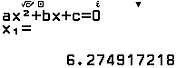


Try the question below. Hover to reveal the answer.

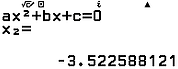
Solve the quadratic equation.

Hover to reveal answer

bottom of page